Instrument training has always been about repetition. You need to fly approaches, hold headings and altitudes under the hood, and build the kind of instrument scan that becomes automatic instead of effortful. The problem is that a lot of that repetition is expensive and weather dependent when you're doing it in a real airplane. That's where a training device like our Redbird FMX comes in, and it's worth understanding exactly what it is and why it's become such a core part of instrument training at GoFly.
What Is an AATD, Actually?
AATD stands for Advanced Aviation Training Device. It's an FAA classification, not just a marketing term, and it sits above the older BATD (Basic Aviation Training Device) category in terms of what it can legally be used for. An AATD has to meet specific FAA requirements for realism, including accurate flight dynamics, a representative instrument panel, and functioning avionics that behave the way the real airplane does. Because it meets that standard, time logged in an AATD counts toward instrument rating requirements under FAA regulations, not just as practice.
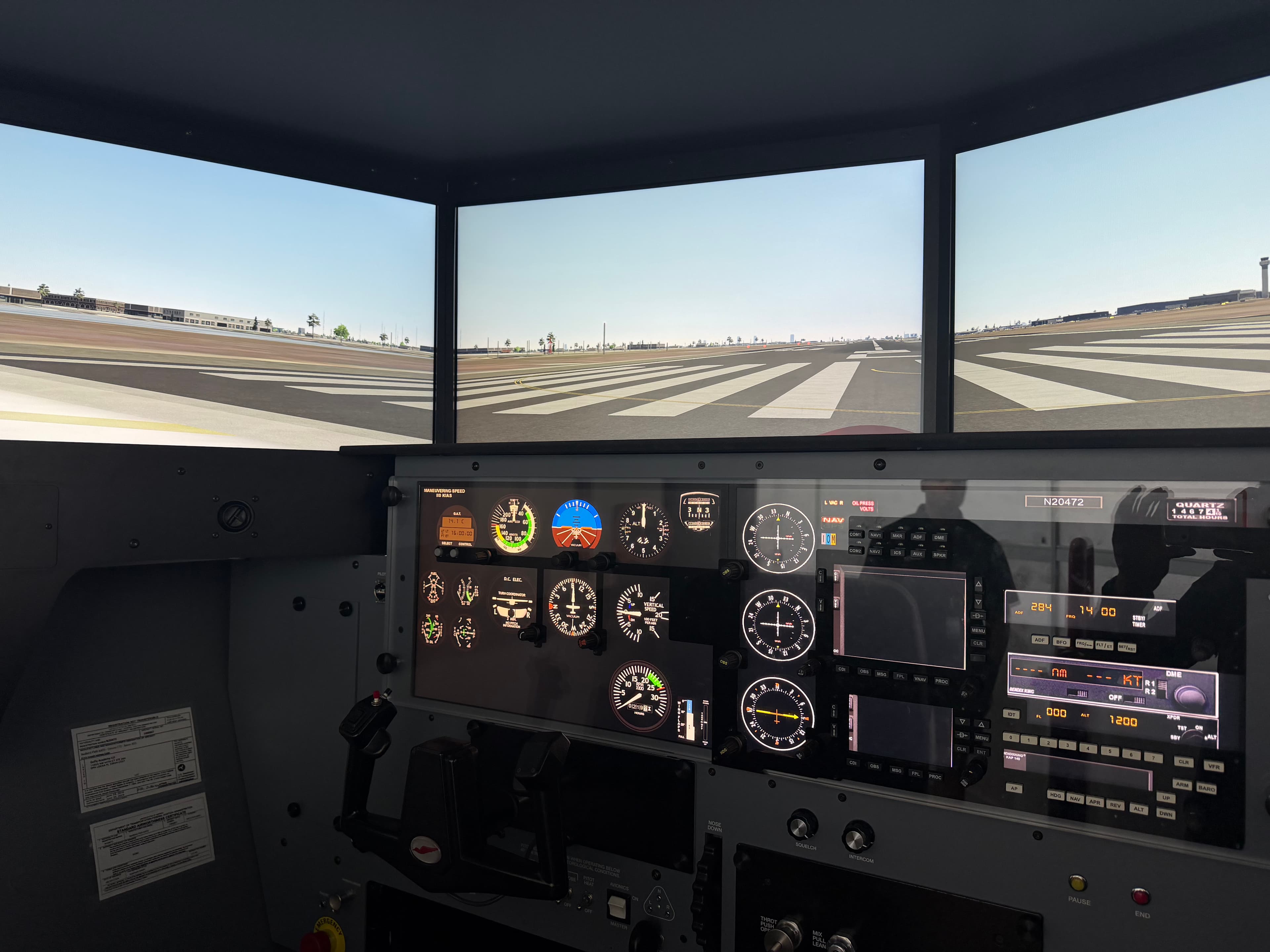
What sets our FMX apart from a basic desktop trainer is the motion platform. The FMX is a full motion device, meaning the entire cockpit physically moves in response to control inputs, simulating pitch, roll, and the subtle accelerations you feel during turns, climbs, and turbulence. That motion feedback is a big part of what makes the training transferable. When you roll into a turn to intercept a localizer or feel the airplane settle during a descent, your body is picking up cues that match what you'd actually feel in flight, not just what you see on the instruments. Combined with the wraparound visual system, realistic yoke and rudder feel, and functioning avionics, the FMX gives you a genuinely representative flying experience instead of a video game approximation of one.
Why the FMX Works So Well for Instrument Training
Instrument flying is fundamentally about procedure. You're managing a sequence of tasks, tuning frequencies, setting up approaches, briefing minimums, and flying precise headings and altitudes, all while interpreting instruments instead of looking outside. None of that requires an airplane in motion through actual airspace. What it requires is repetition until the procedure becomes second nature.
The FMX lets us do things in a two hour session that would take an entire flight day in the airplane. We can freeze the sim mid-approach to talk through a mistake, reposition instantly to fly the same approach five times in a row, or set up an equipment failure that would be genuinely risky to simulate at altitude. Weather that would scrub a real flight, like low ceilings or gusty crosswinds, is exactly the kind of weather we want to practice in the sim. A student can fly an ILS to minimums in real instrument conditions inside the FMX without waiting on the actual weather to cooperate.
This is also where a lot of the mental workload of instrument flying gets built. Holding patterns, procedure turns, and partial panel work all take repetition to become smooth, and the FMX lets a student build that muscle memory without burning airplane time or fuel to do it.
How Much of Your Instrument Rating You Can Complete in the FMX
Under our Part 141 instrument rating course, students can complete up to 40 percent of their required instrument training time in the FMX. That's a significant portion of the course, and it changes the economics and pacing of instrument training in a meaningful way. Simulator time costs less than airplane time, and it isn't affected by weather, aircraft availability, or maintenance downtime. A student working through the instrument syllabus can knock out holding procedures, partial panel work, and anything from an RNAV LPV to a VOR approach in the FMX, then transfer straight into the airplane once the fundamentals are solid.
This doesn't mean the FMX replaces real instrument flying. Actual instrument conditions, real ATC communication under workload, and the physical sensations of flying on the gauges are things only the airplane can teach. What the FMX does is let students arrive at those airplane flights already fluent in the procedures, so the time in the aircraft goes toward refining real-world judgment instead of fumbling through a new approach for the first time.
Same Avionics, Same Database: Why the GNS 430W Match Matters
One detail that makes a real difference is that our FMX is set up with the same Garmin GNS 430W avionics found in our Cessna 172 fleet, including the same navigation database. That might sound like a small thing, but it removes an entire layer of friction from instrument training.
If a student learns approach procedures on a simulator with a different navigator layout, they have to relearn button sequences and menu structures the first time they sit in the actual airplane, on top of everything else they're managing in flight. Because our FMX mirrors the GNS 430W hardware and database, the muscle memory built in the sim, loading an approach, activating a leg, setting up vectors to final, transfers directly into the airplane with no relearning required. A student can load and fly the exact same instrument approach into KOPF in the FMX that they'll fly for real the next day, using the same waypoints and the same procedure as it's actually coded in the box.
That consistency matters more in instrument training than almost anywhere else in flight training, because instrument flying already asks a student to manage a lot of information at once. Removing the "which airplane am I in" variable lets students focus their mental energy on the actual flying instead of relearning equipment.
What a Typical FMX Session Looks Like
A session usually starts with a briefing on what we're working on that day, whether it's a specific approach type, holding entries, or partial panel emergencies. From there, the instructor can set the weather, the airport, and the failure scenario before the student even starts the engine. Because repositioning and resetting take seconds instead of the flight time it would take in the airplane, students get far more approach repetitions in a single session than would be realistic to fly for real.
Instructors also use the FMX to introduce scenarios that would be unsafe or impractical to practice at altitude, like a full electrical failure during an approach or a missed approach that stacks on top of another instrument problem. Working through those situations in a controlled environment builds the kind of decision making that instrument pilots need without the risk.
Instrument Training That Fits Miami's Weather and Schedule
South Florida's weather can be a mixed blessing for instrument training. Actual IMC shows up often enough that students get real experience flying in the clouds, but pop up thunderstorms and shifting ceilings can also eat into a flight schedule fast. Having an FAA-approved AATD on site means training doesn't grind to a halt when the weather doesn't cooperate. Students at GoFly Academy can keep moving through the instrument syllabus on the ground in the FMX and step straight into the airplane once conditions allow, which keeps the overall timeline for earning an instrument rating more predictable.
If you're researching flight training in Miami and want to understand how instrument training actually works day to day, we're happy to walk you through the syllabus, the FMX, and what a realistic timeline looks like for your instrument rating.